Assembly and Installation
Safety Instructions
The WARP Energy Manager 1.0 is designed to ensure safe operation if it has been installed correctly, is in perfect technical condition and this operating manual is followed.
The WARP Energy Manager may only be installed by a qualified electrician.
Intended Use
In conjunction with an external energy meter, the WARP Energy Manager can be used for energy monitoring. In conjunction with WARP Charger chargers, this enables power-dependent control of the charging of electric vehicles. The energy manager is not suitable for other applications. Use in places where explosive or flammable substances are stored is not permitted. Any modification of the energy manager or improper operation is prohibited. The energy manager must be installed in a suitable distribution cabinet and protected from damage, moisture/dirt and improper access. It must not be used if safe operation cannot be ensured.
Device Malfunction / Technical Defect
If there are signs of a technical defect, the power supply of the energy manager must be disconnected immediately and secured against being switched on again. A qualified electrician must then be informed.
Assembly
Scope of Delivery
The WARP Energy Manager 1.0 delivery includes:
- WARP Energy Manager (DIN rail module)
- Pluggable screw terminals
- 2-pin screw terminal 5 mm (230 V power supply (L+N))
- 2-pin screw terminal 5 mm (contactor)
- 4-pin screw terminal 3.5 mm (inputs)
- 2-pin screw terminal 3.5 mm (relay output)
- 4-pin screw terminal 3.5 mm (RS485 Modbus-RTU)
- This operating manual incl. individual WiFi access data
- RJ45 LAN angle adapter
Installation Location
The WARP Energy Manager may only be installed in a suitable distribution cabinet indoors. It must be protected from dust, moisture and improper access. A LAN connection should be made to the WARP Energy Manager, as in many cases a WiFi connection of the WARP Energy Manager is not reliably possible due to the metal shielding of the distribution cabinet.
There must be sufficient space available. No pressure may be exerted on the cables, especially not on the LAN connection. For this reason, we recommend using the included LAN angle adapter.
Mounting
To mount the WARP Energy Manager, it must be placed on the DIN rail. The housing must be installed so that the connections point downward.
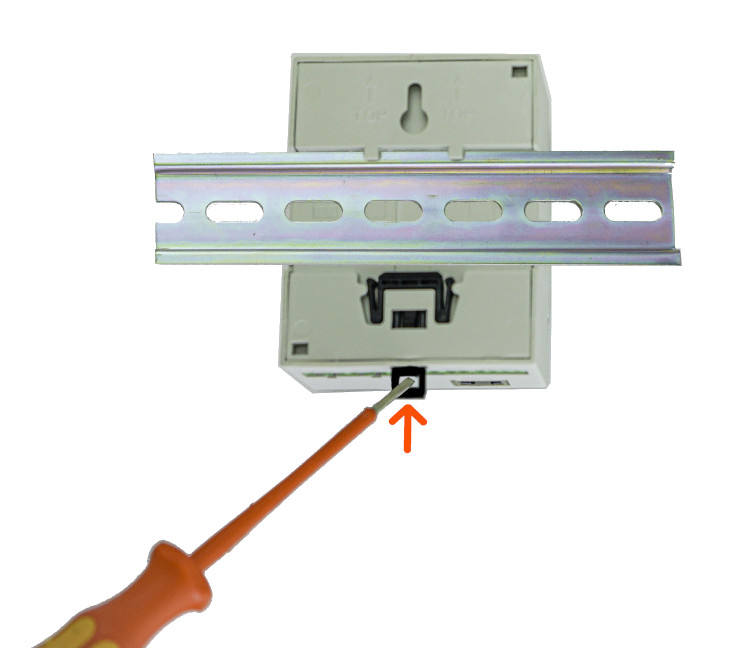
First, the upper bracket is placed on the DIN rail and then the lower one. The energy manager should lock automatically; if this is not the case, you can assist with a screwdriver at the black lock on the bottom.
If the WARP Energy Manager is to be removed from the DIN rail again, all supply lines must first be removed (Caution: Ensure voltage-free state!). Then, using a flat-head screwdriver, pull the black spring lock and lift the energy manager from the DIN rail. The lower bracket should be lifted first, followed by the upper bracket.
Electrical Connection
The work described in this chapter may only be performed by a qualified electrician!
Power Supply
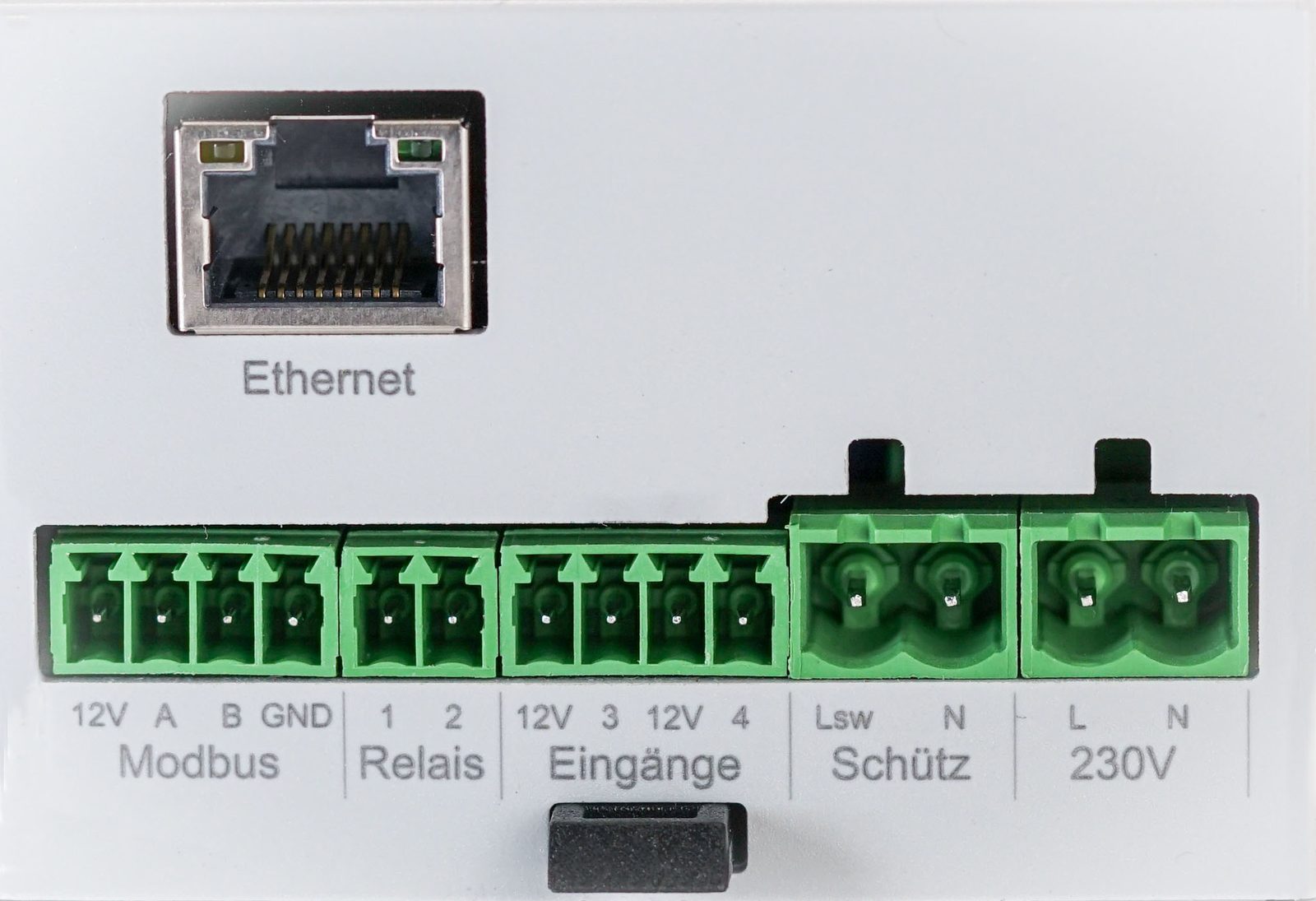
After the WARP Energy Manager has been mounted, it can be connected. The screw terminals are pluggable, so electrical connection can be made externally. Then the screw terminals can be plugged back into the WARP Energy Manager.
The power supply to the WARP Energy Manager is via a two-pin screw terminal (L+N). The supply line must be protected with a max. 16 A circuit breaker with B-characteristic.
The energy manager's power supply is additionally internally protected by a glass fuse (medium time-lag (M), 500 mA).
Contactor for Phase Switching
A contactor only needs to be installed if phase switching is to be used. If no switching is to take place, the chargers can be permanently connected with one or three phases without a contactor.
An external contactor can be installed for phase switching, i.e. switching between single-phase and three-phase vehicle charging. The contactor is controlled by the WARP Energy Manager via a 230 V switching output (Lsw). The minimum phase current for Type 2 charging is 6 A. This reduces the minimum charging power from 4.1 kW to 1.4 kW.
For control, N and Lsw are led out. The Lsw switching output is internally protected by a glass fuse (medium time-lag (M), 500 mA).
Inputs
The WARP Energy Manager has two inputs for potential-free contacts. Normally open or normally closed contacts can be connected to these. The behavior of the energy manager in relation to these inputs can be configured in the web interface.
If a contactor for phase switching is installed, input 4 is permanently configured for contactor monitoring. A normally open contact must be installed between 12V and 4, which is switched by the contactor to be monitored. If the accessory WARP Energy Manager Phase Switcher is used, terminals 23 and 24 of the contactor's status contact must be connected.
If no contactor is used for phase switching, input 4 can be used for other purposes. Input 3 is always available for your own purposes. The inputs are designed so that a potential-free contact can be connected externally (switch as normally closed/normally open contact, relay etc.). The 12V connections of the inputs are high-impedance, do not deliver any power and are therefore not suitable for supplying other consumers.
Relay Output
Up to 30 V/1 A can be switched with the potential-free relay switching output. Switching mains voltage is not possible!
RS485 Modbus Energy Meter
It is not necessary to install an RS485 Modbus energy meter. This step is optional if another supported energy meter is configured.
The WARP Energy Manager requires an energy meter to be able to regulate the power consumption. One option for this is the installation of an RS485 Modbus energy meter of type Eastron SDM72DMV2, SDM630MCT or SDM630Modbus.
The connector assignment is 12V, A, B, GND. The 12V connection must not be used. A (+), B (-), GND must be connected to the respective energy meter accordingly.
LAN Connection
Control of the chargers is via a network. We recommend connecting the WARP Energy Manager via LAN. The LAN connection required for this is located in front of the other connections when installed. To avoid damage, the LAN socket is flexibly mounted. Nevertheless, we recommend not connecting a LAN cable directly to the energy manager, but using the included RJ45 angle adapter between energy manager and LAN cable.
The energy manager is not yet ready for operation! It must now be configured via the web interface. See Configuration and Setup.