Home Assistant
Introduction
Your WARP Charger or WARP Energy Manager is compatible with Home Assistant. Home Assistant is an open-source home automation solution with broad device support.
For connecting WARP devices, Modbus and MQTT can be used. In this guide, we will use MQTT. Furthermore, it is assumed that Home Assistant is already installed and operational. Instructions for this can be found on the official website.
MQTT
Setting up MQTT in Home Assistant
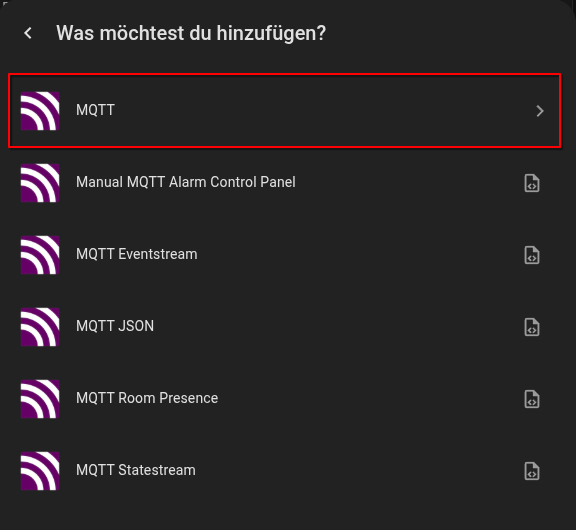
First, MQTT must be activated in Home Assistant. Go to Settings -> Devices & Services -> Add Integration in the web interface. In the window that opens, search for "MQTT" and select it. Various MQTT integrations are available. We need the simple MQTT integration:
You will then be asked about the MQTT broker. If you don't want to use your own MQTT broker, the easiest way is to use the official MQTT broker app. This is installed automatically.
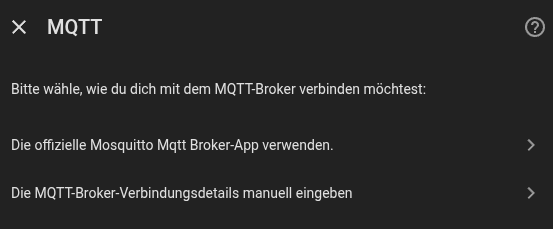
If Home Assistant was installed as a Docker container, adding apps via the web interface is not possible. In this case, the MQTT broker must be installed and configured separately. Installation in a Docker container is therefore only recommended for advanced users.

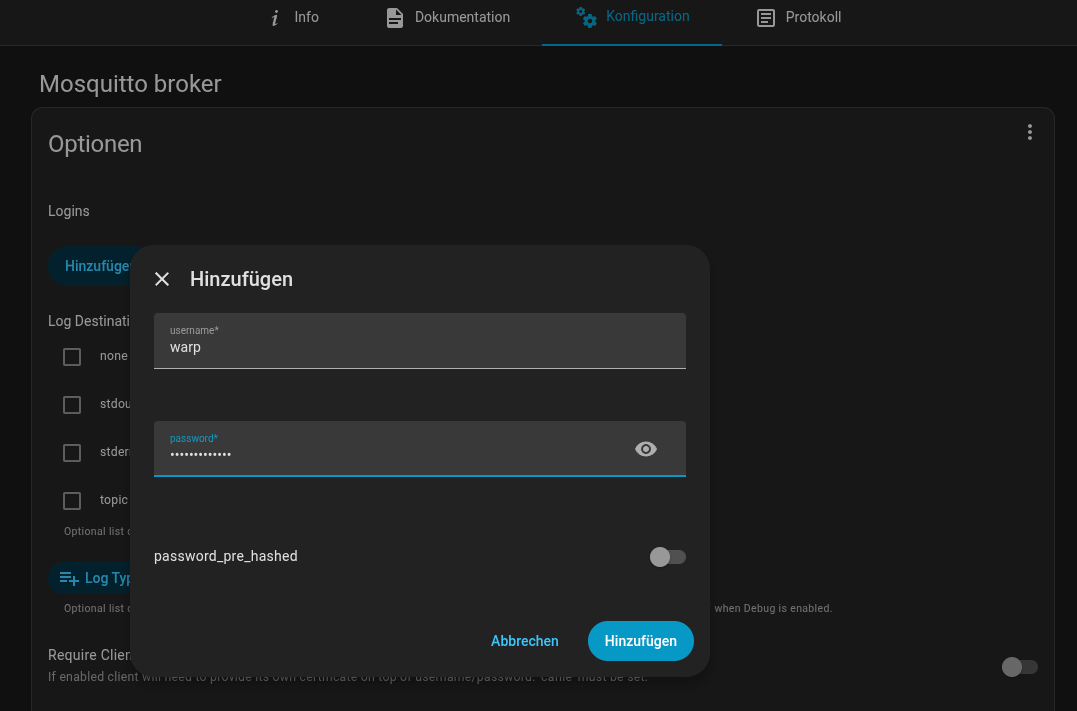
Finally, go to Settings -> Apps -> Mosquitto broker -> Configuration and create a login there. Here you can also find the ports for the various MQTT protocols.
Don't forget to save!
Setting up MQTT in WARP Charger/WARP Energy Manager
The MQTT broker is configured in the MQTT settings according to the Introduction.
For automatic integration into Home Assistant, set the Discovery mode to "Home Assistant/openHAB/Domoticz/FHEM".
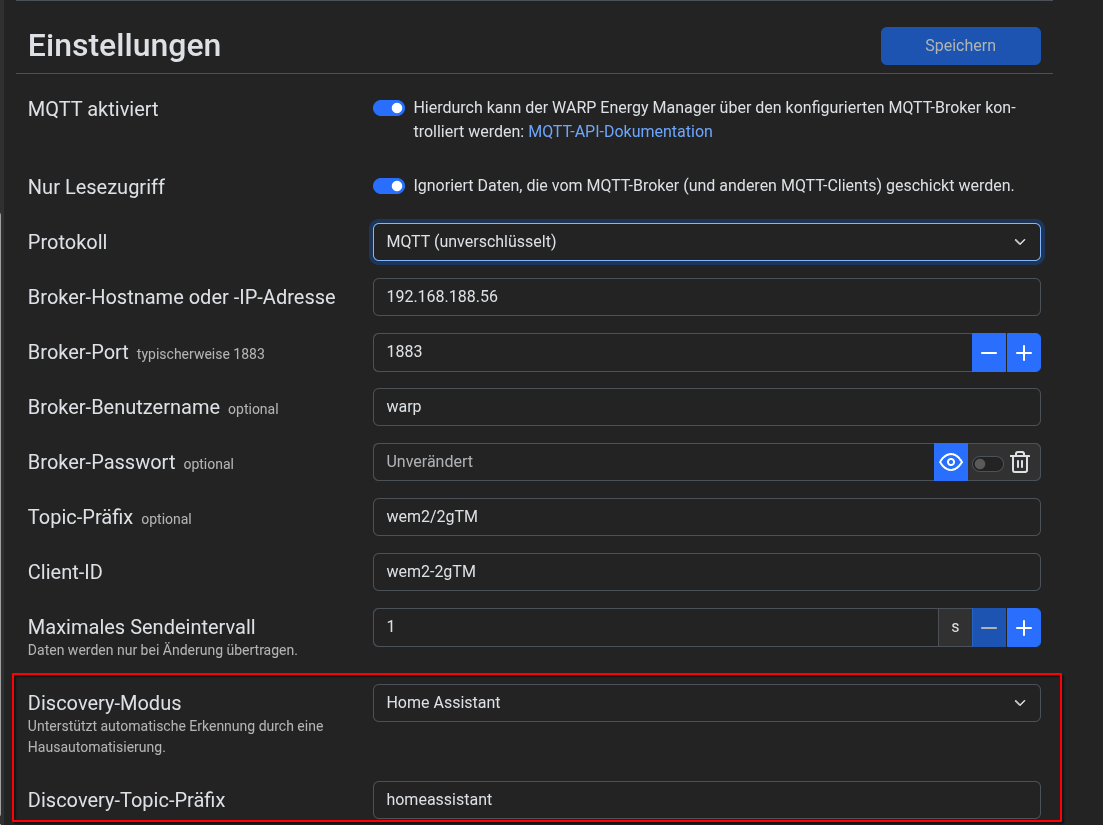 The discovery topic prefix defaults to
 homeassistant and must match the Home Assistant configuration. It must differ from the MQTT API topic prefix.
Discovery messages are sent when discovery starts and then every 15 minutes, and are retained by the broker. After each discovery round, the associated states are also resent so that Home Assistant evaluates the current values using the new sensor definitions.
MQTT Sensor Values in Home Assistant via Autodiscovery
Autodiscovery automatically adds various sensors and controls. Which ones are added depends on whether the device is a WARP Charger or WARP Energy Manager and which functions are activated (e.g. solar forecast).
Autodiscovery removes automatically added entities if the corresponding function is disabled or the configured meter no longer supports the measured value. Disabling discovery or changing the discovery topic prefix deletes the previous discovery messages.
When MQTT is configured for read-only access (read_only), controls are unavailable. To control the charging current limit, External control must also be enabled under Charger → Settings.
Automatically Added Entities
The following entities are provided via autodiscovery:
| Name | Type | Description | Available when |
|---|---|---|---|
| Charge state | Sensor | Numeric charge state: 0 = Not connected, 1 = Waiting for release, 2 = Ready to charge, 3 = Charging, 4 = Error | EVSE present (WARP Charger) |
| Charge state (text) | Sensor | The same charge state as localized text (enum) | EVSE present (WARP Charger) |
| Current charge mode EVSE | Sensor | Charger mode as localized text, including Default mode | EVSE present (WARP Charger) |
| Charging current limit | Number | Maximum charging current in A (0–32 A), controllable | EVSE present (WARP Charger) |
| Allowed charging current | Sensor | Currently allowed charging current in A | EVSE present (WARP Charger) |
| Start charging | Button | Starts the charging process | EVSE present (WARP Charger) |
| Stop charging | Button | Stops the charging process | EVSE present (WARP Charger) |
| Charging cable connected | Binary Sensor | Indicates whether a charging cable is connected | EVSE present (WARP Charger) |
| Charger ready to charge | Binary Sensor | Indicates whether the charger is ready to charge | EVSE present (WARP Charger) |
| Charger charging | Binary Sensor | Indicates whether charging is currently in progress | EVSE present (WARP Charger) |
| Charger error | Binary Sensor | Indicates whether an error is present | EVSE present (WARP Charger) |
| Charger available | Binary Sensor | Indicates whether the charger is reachable | EVSE present (WARP Charger) |
| Front button pressed | Binary Sensor | Indicates whether the front button is pressed | EVSE present (WARP Charger) |
| Limited according to §14a EnWG | Sensor | Indicates whether a limitation according to §14a EnWG is active | §14a EnWG activated in the configuration |
| Active charge mode | Select | Select charge mode; offers only the currently supported modes (see below) | Charge management enabled and selectable charge modes available |
| Current charge mode | Sensor | Active charge management mode as localized text | Charge management enabled |
| Solar forecast tomorrow | Sensor | Forecasted PV yield for tomorrow in kWh | Solar forecast activated |
| Solar forecast today | Sensor | Forecasted PV yield for today in kWh | Solar forecast activated |
| Solar forecast from now | Sensor | Remaining forecasted PV yield for today in kWh | Solar forecast activated |
| Electricity market price | Sensor | Current spot market electricity price in ct/kWh | Dynamic electricity prices activated |
The numeric Charge state sensor retains its original discovery ID chargerstate. The additional text sensor uses chargerstate_text.
Charge Modes
The Active charge mode selector follows the supported modes reported by charge management and matches the available modes in the web interface:
| Enabled functions | Selectable charge modes |
|---|---|
| Neither PV excess charging nor Eco | Fast, Off |
| PV excess charging | Fast, Off, PV, Min + PV |
| Eco | Fast, Off, Eco, Eco + Min |
| PV excess charging and Eco | Fast, Off, PV, Eco + PV |
Discovery is resent when the list of supported modes changes. The Current charge mode and Current charge mode EVSE sensors can additionally display Min, Eco + Min + PV, and Default mode. Default mode is not a selectable mode.
Vehicle Data (WARP4)
WARP4 additionally provides the following sensors:
| Name | Description | Unit |
|---|---|---|
| Vehicle name | Name of the recognized vehicle | - |
| Vehicle MAC Address | MAC address of the recognized vehicle | - |
| Vehicle State of Charge | State of charge of the vehicle battery | % |
| Vehicle Battery Capacity | Capacity of the vehicle battery | kWh |
Vehicle sensors are only available when a vehicle MAC address has been detected. Missing state of charge or battery capacity values are shown as unknown. Vehicle name and MAC address are read-only sensors.
Meter Values
The legacy meter sensors retain their original discovery IDs when the device provides the corresponding meter features:
| Name | Discovery ID | Description | Unit |
|---|---|---|---|
| Power draw | powernow | Current power from meter/values | W |
| Energy consumption (absolute) | energyabs | Absolute energy reading from meter/values | kWh |
| Energy consumption (relative) | energyrel | Energy reading since the last reset from meter/values | kWh |
| Current L1 / L2 / L3 | current_l1 / current_l2 / current_l3 | Phase currents from meter/all_values, if available | A |
Additionally, the following measured values are provided for each configured meter slot if supported by that meter. Entity names include the configured meter name. The value ID identifies the measurement in the meter API:
| Name | Value ID | Description | Unit |
|---|---|---|---|
| Voltage (L1-N / L2-N / L3-N) | 1 / 2 / 3 | Voltage of each phase against neutral | V |
| Current (draw minus feed) (L1 / L2 / L3) | 14 / 18 / 22 | Signed current per phase | A |
| Active power (draw minus feed) (Σ L1, L2, L3) | 74 | Total active power | W |
| Active energy (draw) (Σ L1, L2, L3; since manufacturing) | 209 | Absolute imported active energy reading | kWh |
| Active energy (feed) (Σ L1, L2, L3; since manufacturing) | 211 | Absolute exported active energy reading | kWh |
| DC voltage | 10 | DC voltage | V |
| DC current | 35 | DC current | A |
| DC power | 160 | DC power | W |
| DC energy (draw) (since manufacturing) | 405 | Absolute DC energy import | kWh |
| DC energy (feed) (since manufacturing) | 407 | Absolute DC energy export | kWh |
| DC voltage (⌀ PV) | 430 | Average PV DC voltage | V |
| DC current (feed) (Σ PV) | 441 | Total PV DC current | A |
| DC power (draw minus feed) (Σ PV) | 453 | Total PV DC power | W |
| DC energy (feed) (Σ PV; since manufacturing) | 472 | Absolute PV energy yield | kWh |
| State of charge | 387 | Battery state of charge | % |
| Capacity | 475 | Battery capacity | kWh |
| Frequency (⌀ L1, L2, L3) | 364 | Grid frequency | Hz |
The localization of the entities depends on the language of the web interface of the WARP Charger/WARP Energy Manager.