OpenHAB
Introduction
Your WARP Charger or WARP Energy Manager is compatible with OpenHAB. OpenHAB is an open-source software solution for home automation that connects components from various manufacturers in a vendor- and protocol-neutral way on a single platform.
MQTT can be used to connect WARP devices. Since OpenHAB supports the same discovery mechanism as Home Assistant, seamless integration is possible.
Integration via MQTT
OpenHAB Configuration
We assume that you have already installed OpenHAB. Additionally, you need an MQTT broker, as OpenHAB does not include a broker. We recommend Mosquitto.
After the initial setup, the necessary bindings must be installed. We need the MQTT Binding and the Home Assistant Binding.
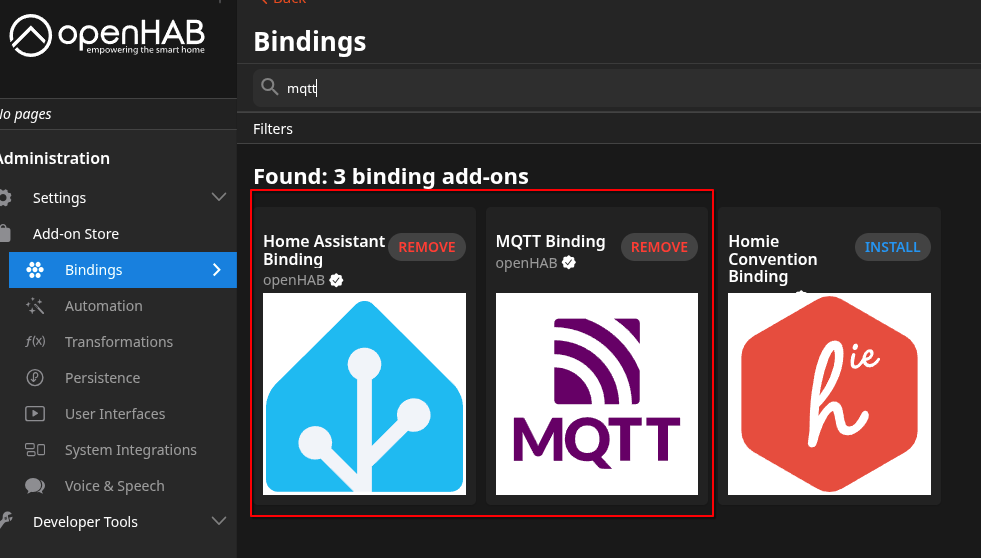
After installation, we only need to configure MQTT.
To do this, go to Settings → Things → "+" → MQTT Binding → MQTT Broker. The broker's address is entered there. If a username or password is set on the broker, or if MQTTS (MQTT over TLS) is to be used, this can be configured in the advanced settings. It is also important that discovery is enabled in the advanced settings.
WARP Charger/WARP Energy Manager Configuration
The WARP Charger/WARP Energy Manager is configured as described in MQTT/HTTP API.
The address of the configured MQTT broker is entered as the broker hostname.
Set the discovery mode to "Home Assistant/openHAB/Domoticz/FHEM" and the discovery topic prefix to homeassistant. The discovery topic prefix must differ from the MQTT API topic prefix. The former generic mode is no longer needed; existing configurations are automatically migrated.
Integration in OpenHAB
After both sides are configured, the WARP device should appear in Settings → Things → Inbox. Discovery messages are sent when discovery starts and then every 15 minutes, and are retained by the broker. Changes to discovery settings take effect without a restart. After each discovery round, the associated states are also resent.
The discovered devices are added from the Inbox as a Thing.
Finally, we add the devices to the Model: Settings → Model. Select Create Equipment from Thing and choose the WARP device.
The description of the data points and under what circumstances they are available can be found in the Home Assistant documentation.