Charge Status
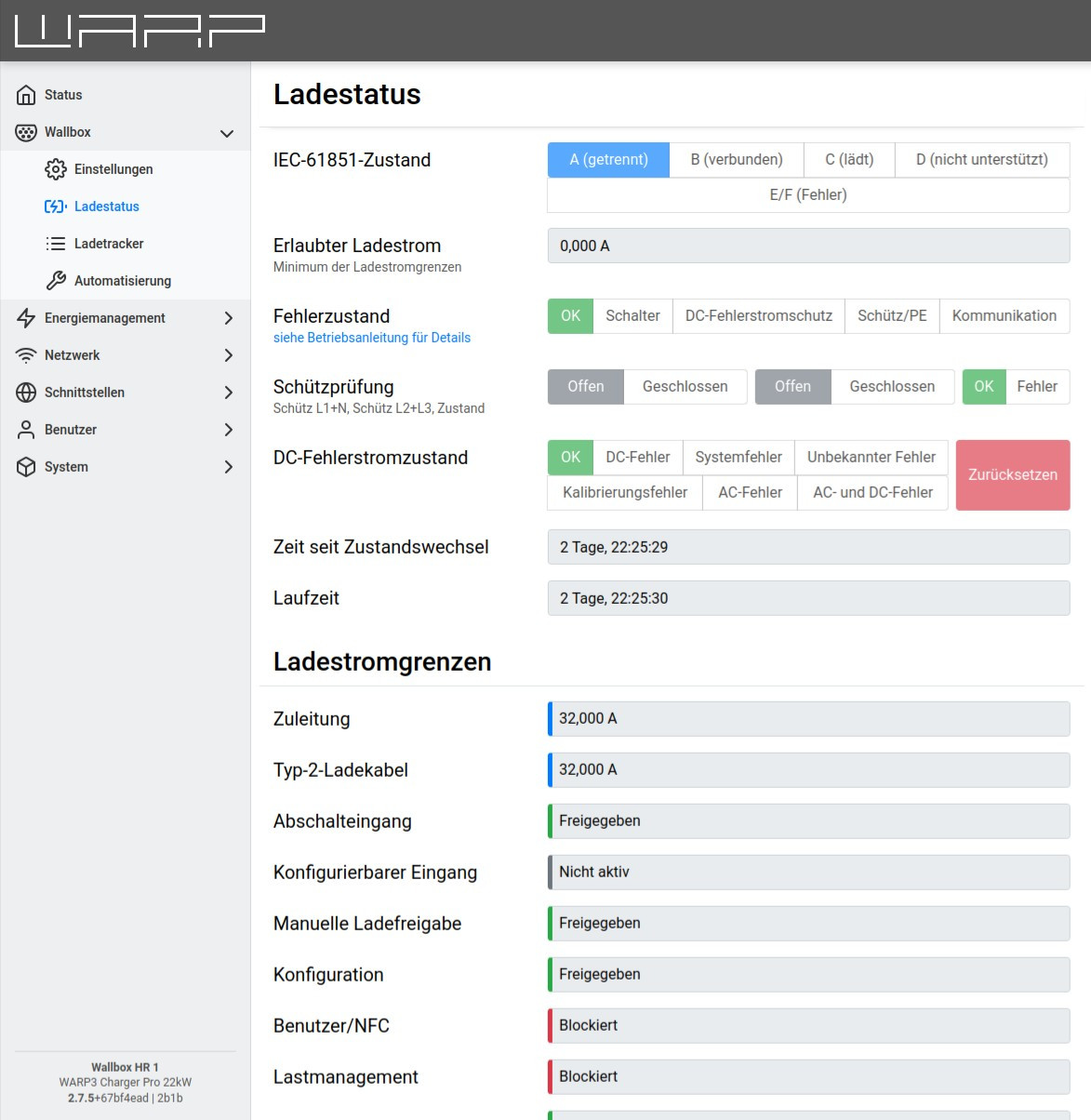
The charge status subpage provides information about the state of the charge controller (EVSE) and its hardware configuration. Problems with charging can be diagnosed using the information on this page.
If the internally installed DC residual current protection has triggered, it can be reset here.
Charging Current Limits
This section displays the current charging current limits. All limits that are currently active are included in the decision of whether a charging process is allowed and in the calculation of the maximum charging current: A charging process is only allowed if all active charging current limits do not block. The allowed charging current is then the minimum of all active limits.
The following limits can be part of the calculation:
-
Supply line: Maximum current of the supply line to the WARP3 Charger. This is configured via the switches on the charge controller.
-
Type 2 charging cable: Maximum current of the Type 2 charging cable.
-
Shutdown input: Blocks or releases the charging process, depending on the configuration of the shutdown input.
-
Configurable input: Analogous to the shutdown input, can block, limit, or release depending on configuration.
-
Manual charge release: Can block or release through autostart setting or pressing the button.
-
Configuration: Set through the input field on the status page. The Release button completely removes any entered charging current limit.
-
User/NFC: Blocks until a user releases the charging process with an NFC tag, if user authorization is enabled. Afterwards, the charging current limit assigned to this user is entered.
-
Charge management: Controlled by the charge manager or PV excess charging, if enabled.
-
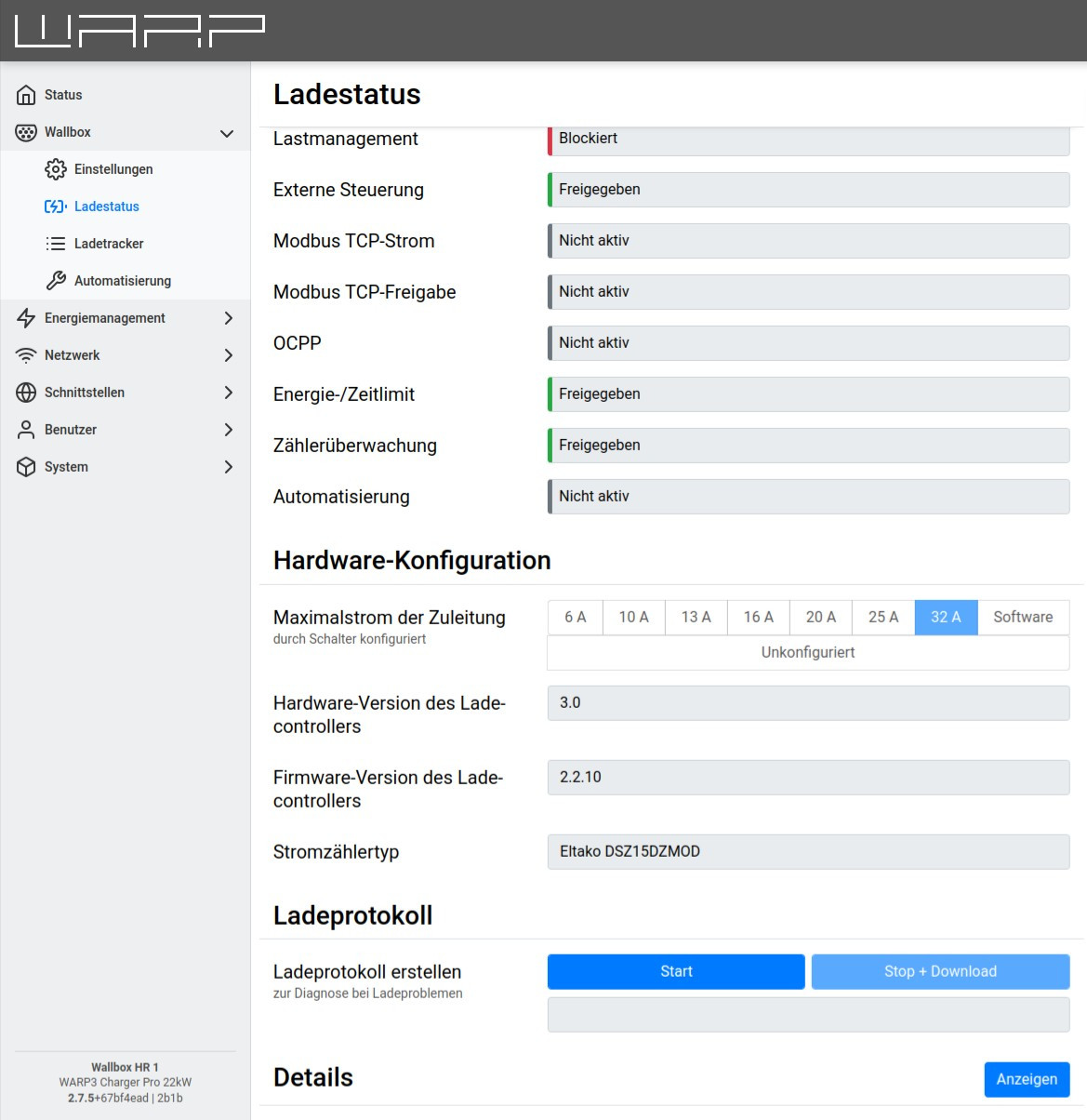
External control: Controlled by an external controller via the API, for example EVCC.
-
Modbus TCP current: Restriction of charging current when Modbus TCP interface is enabled.
-
Modbus TCP release: Release/blocking of charging process when Modbus TCP interface is enabled.
-
OCPP: Release/blocking of charging process when OCPP interface is enabled.
-
Energy/time limit*: Limitation by configured energy or time limits.
-
Meter monitoring: Blocked when meter monitoring is enabled and no communication with the energy meter is possible.
-
Automation: Limitation by a rule configured on the automation subpage.
The color marking next to a limit has the following meaning:
- Gray: This charging current limit is not active. It cannot block the charging process and is not included in the calculation of the allowed charging current.
- Green: This charging current limit is active, but does not currently restrict the allowed charging current.
- Blue: This charging current limit is active and specifies a charging current limit. However, other active limits restrict the charging current more.
- Yellow: This charging current limit is active, does not block the charging process, but specifies the currently strongest limitation of the charging current.
- Red: This charging current limit is active and blocks the charging process.
Hardware Configuration
Under the heading Hardware Configuration, information about the installed hardware is listed.
Charge Log
In case of charging aborts, a charge log can help determine the cause of an error. A charge log can be recorded as follows:
- Start charge log in the browser (Start), keep browser window open.
- Connect vehicle to charger and start charging process.
- After the error occurs, click Stop+Download. A text file should be downloaded.
- Send the text file with a problem description to info@tinkerforge.com.