Controllable Consumption Device According to §14a EnWG
The following video explains §14a EnWG and shows the setup on the WARP Charger and the WARP Energy Manager.
The video is only available in German (with German subtitles). §14a EnWG is a German regulation, and the video uses the German terms as they appear in the documents of the German grid operators.
Chargers are classified as controllable consumption devices according to §14a EnWG, as their connection power exceeds 4.2 kW.
WARP Chargers and WARP Energy Managers include a dedicated §14a EnWG module that centrally configures grid operator control. Depending on the selected signal source, when a control signal is received the calculated power limit is automatically applied to the configured consumers (chargers and/or heating).
Which signal source can be used depends on the requirements of the local grid operator and the device being used.
§14a EnWG Modules
Users with controllable consumption devices are financially relieved by paying lower grid fees. A module can be chosen for this:
Module 1 - Flat-Rate Reduction
With Module 1, the grid fee is reduced by a flat rate for an assumed fixed electricity consumption. This results in a fixed Euro amount that is credited annually on the electricity bill. This credit is flat-rate and therefore independent of your own electricity consumption. No additional hardware is needed for the technical implementation of Module 1. The reduction has no technical impact on the WARP Charger or WARP Energy Manager. This module is worthwhile for very low electricity consumption.
Module 2 - Percentage 60% Reduction
With this module, the grid fee is reduced to 40 percent on a flat-rate basis. Technically, a separate consumption meter is required for the consumption device. This energy meter incurs additional costs (meter fee). The reduced fee is only calculated for electricity drawn through this meter. Module 2 also has no technical impact on the WARP Charger or WARP Energy Manager. This option is only interesting for consumers with high electricity consumption.
Module 3 - Flat-Rate + Time-Variable Reduction
Module 3 can only be used in combination with Module 1. A flat-rate credit is paid, but additionally the grid fees are time-variable in three levels. This means different grid fees must be paid depending on the time of day. There is a standard tariff with "normal" grid fees, a high tariff with significantly more expensive grid fees, and a low tariff with cheaper grid fees. The times at which the tariffs apply are set by the respective grid operator and vary.
With Module 3, it is worthwhile to shift the electricity consumption of devices such as chargers or heat pumps to low-tariff times. This is possible automatically for WARP Chargers with the Eco Mode and for heat pumps with the WARP Energy Manager 2.0 and its heating module. For this, only the time-variable grid fees need to be configured in the price calendar of the dynamic electricity price. The system automatically combines these with the generation prices (spot market price) and then controls the vehicle charging and the heat pump accordingly at the favorable prices.
Technically, Module 3 requires an intelligent metering system (iMSys = Smart Meter + Smart Meter Gateway). The controllable consumption device is controlled via a control box connected to it. This control box comes in two versions.
Control Box with Switching Outputs (Stepwise Power Reduction)
This control box has switching outputs that can be used to reduce the power of consumption devices. This is comparable to the old ripple control receivers. For reading switching outputs, we offer several implementation options, described below.
Control Box with Digital Interface (Dynamic Power Reduction)
With this control box, a digital interface is used to reduce the power of consumption devices. EEBUS is designated for this purpose. Control takes place over the network. The WARP Charger or WARP Energy Manager can be controlled directly via EEBUS, as described below.
Technical Implementation
There are various options for implementing controllability according to §14a, which are explained below.
Ripple Control Receiver/Control Box on the WARP Charger
A potential-free contact (voltage-free switching contact) can be connected at the shutdown input inside the charger. For this, a control line from the ripple control receiver or the grid operator's control box must be routed into the charger and connected to the charge controller. For details on the connection at the terminal block, see Assembly and Installation.
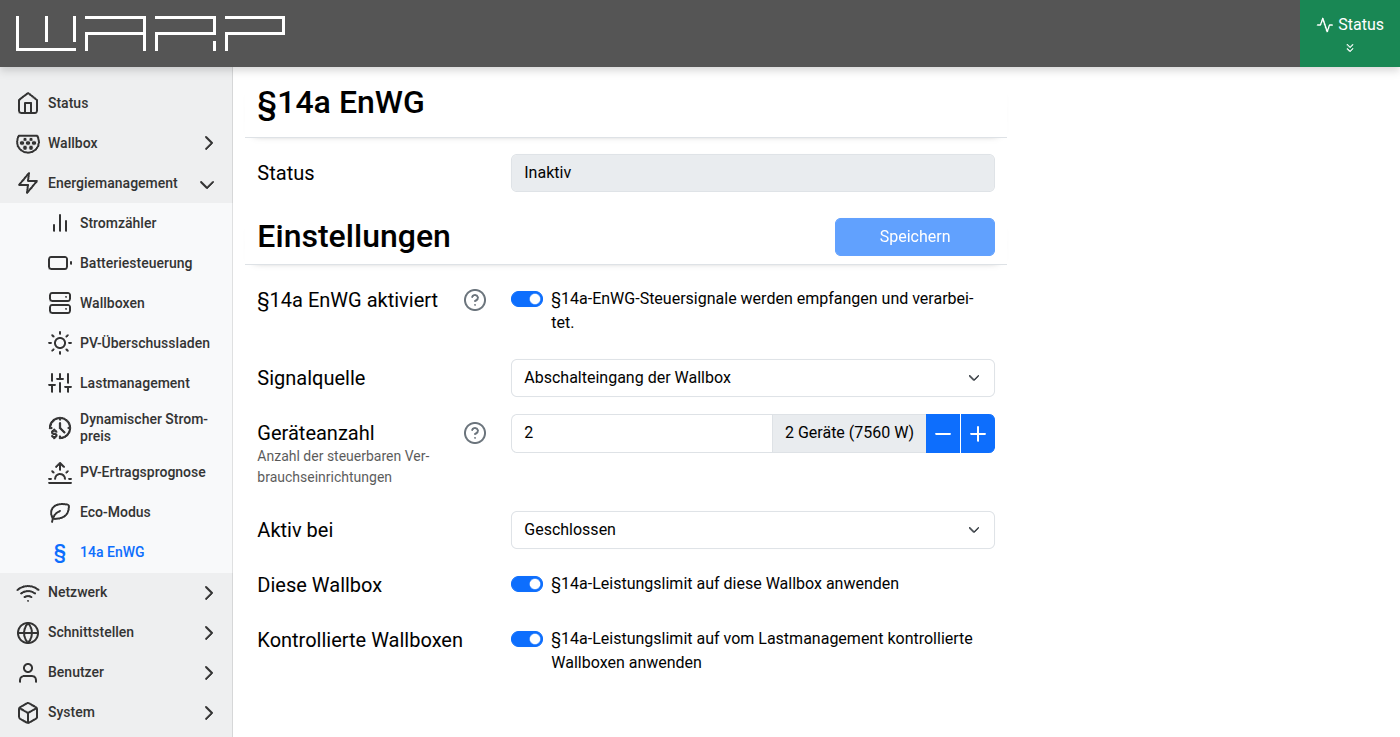
In the §14a EnWG module, select Charger shutdown input as the signal source and enable This charger. The power limit is then automatically applied as soon as the grid operator switches the input.
Ripple Control Receiver/Control Box on the WARP Energy Manager
Instead of routing a control line into the charger, there is also the option to connect one of the four inputs of the WARP Energy Manager to the ripple control receiver or control box. The WARP Energy Manager then controls the power of the charger(s) via the network (LAN/WLAN). A separate control line to the charger is not required. For details on the connection, see Assembly and Installation.
In the §14a EnWG module of the Energy Manager, select WARP Energy Manager input as the signal source, configure the corresponding input (1-4) and enable Managed chargers. The WARP Energy Manager must be the charge manager of the chargers. With the WARP Energy Manager 2.0, a heat pump (SG-Ready) can additionally be included as Heating.
EEBUS
EEBUS is the designated interface for grid operator control of consumer devices. In the §14a EnWG module, select EEBUS as the signal source. The control signal is then received via the EEBUS interface.
WARP Chargers or the WARP Energy Manager can then react to the control commands.
API (HTTP/MQTT)
The control signal can also be received via the HTTP or MQTT API. In
the §14a EnWG module, select API as the signal source. Details can
be found in the API documentation under p14a_enwg/control_update.
Other Interfaces (OCPP, Modbus TCP)
In general, the charging power of the charger can also be controlled via all other implemented interfaces. Grid operators currently use OCPP or Modbus TCP for control, if at all. These interfaces do not use the §14a EnWG module but control the charger directly.
Further Information
- §14a EnWG module (configuration) — Documentation of all settings
- Heating — SG-Ready control configuration
- EEBUS interface — Details on the EEBUS connection