Vehicles
On the Vehicles page, vehicle profiles can be created. A vehicle profile assigns a name and further properties to a vehicle based on its MAC address. The MAC address is a unique network identifier that the charger reads out when a vehicle connects, via ISO 15118 (SLAC).
Vehicle profiles are used for two functions:
- Autocharge: Automatic charge authorization via vehicle identification. If the profile is assigned to a user, charging sessions can be attributed to that user in the charge log and the user's individual charging current limit can be applied.
- State-of-charge estimation: Based on the configured battery capacity and charging efficiency, the state of charge (SoC) is estimated during charging.
Vehicle identification via MAC address requires that the charger can communicate with the vehicle via ISO 15118 and that the Autocharge option is enabled in the ISO 15118 settings.
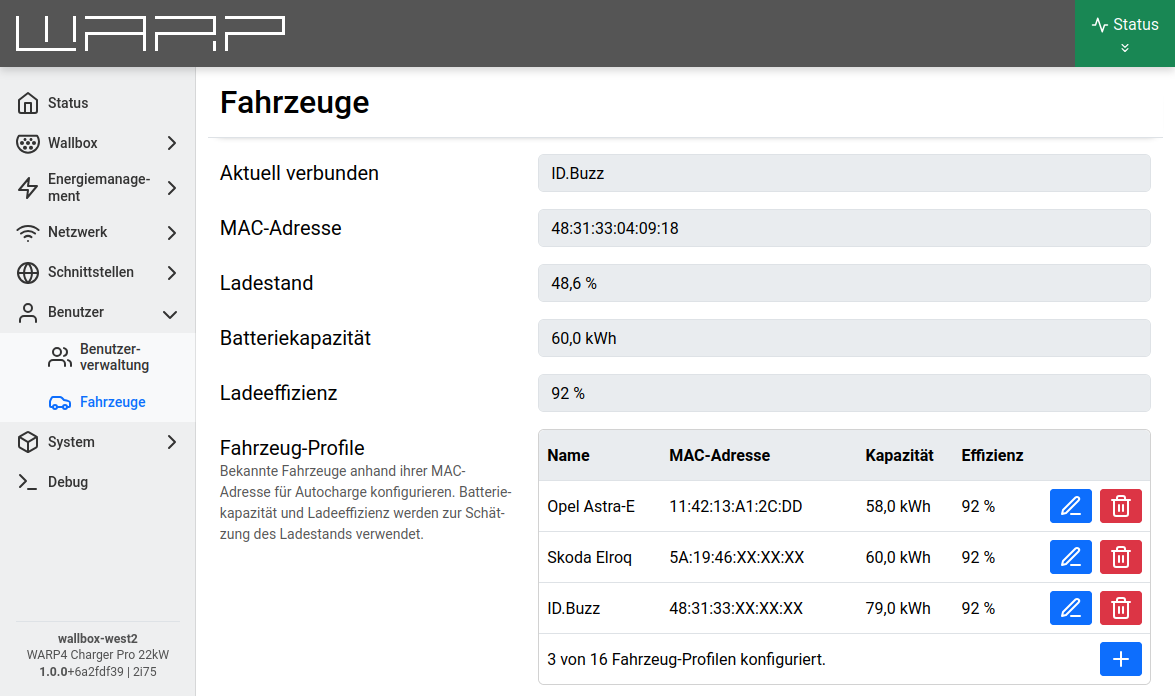
Currently connected vehicle
The upper area of the page shows the currently connected vehicle. If no vehicle is connected, this area is collapsed.
As soon as a vehicle is connected, the following information is shown:
- Currently connected: The name of the matching vehicle profile. If no profile exists, the vehicle's MAC address is shown instead.
- MAC address: The MAC address read from the connected vehicle (only for known vehicles).
- State of charge: The estimated state of charge, if it could be read out or estimated.
- Battery capacity and charging efficiency: The values from the vehicle profile used for the estimation (only for known vehicles).
The state of charge is read from the vehicle once via ISO 15118 at the beginning of a charging session (Read SoC option in the ISO 15118 settings) and is then updated during charging based on the energy charged as well as the battery capacity and charging efficiency stored in the profile. This requires the built-in energy meter of the WARP4 Charger Pro.
Vehicle profiles
The Vehicle profiles table lists all created vehicles with name, MAC address, capacity, and efficiency. Up to 16 vehicle profiles can be created.
An existing profile can be edited via the pencil icon or deleted via the trash can icon. A new profile is added via the + button.
Adding a vehicle profile
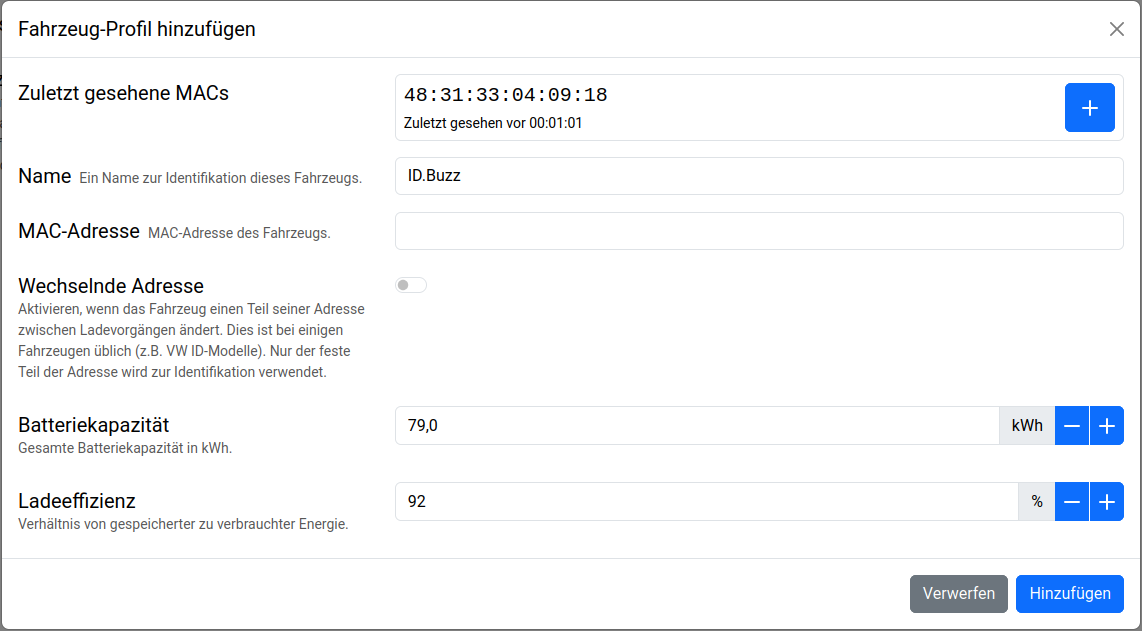
When adding or editing a profile, a modal window with the following input fields opens.
-
Recently seen MACs: Here, MAC addresses of vehicles that were recently connected to the charger are listed, including when they were last seen. Clicking the + button next to an address copies it directly into the MAC address field. If a displayed MAC is already assigned to a profile, this is indicated accordingly.
If this WARP charger is a charge manager for multiple chargers and central management is enabled (see the Chargers section), MAC addresses seen by one of the managed chargers are listed here as well. In that case, the charger at which the vehicle was seen is also shown.
-
Name: A freely selectable name to identify the vehicle (maximum 16 characters).
-
MAC address: The vehicle's MAC address in the format
AA:BB:CC:DD:EE:FF. Usually it is taken from the Recently seen MACs list, but it can also be entered manually. -
Changing address: Some vehicles change part of their MAC address between charging sessions (e.g. VW ID models). If this switch is enabled, only the fixed front part of the address (the first three blocks, the manufacturer part) is used for identification; the rear blocks are shown as
XX:XX:XXand ignored. -
Battery capacity: The net battery capacity of the vehicle in kWh. This value is used to estimate the state of charge.
-
Charging efficiency: The ratio of energy stored in the vehicle to energy delivered by the charger, in percent (default: 92 %). If the charging efficiency is unknown, 92 % is a good starting value. This value can be adjusted at any time.
Interaction with Autocharge
For a matching vehicle profile to actually result in automatic charge authorization, the Autocharge function must be enabled in the ISO 15118 settings. When Autocharge is active, the charger reads the vehicle's MAC address when a vehicle connects and uses it as an identification source for charge authorization, analogous to an NFC tag.
If the matching profile is assigned to a user, the charging session is attributed to that user.
Assignment to users
A vehicle profile can be assigned to a user, so that charging sessions authorized via Autocharge are attributed to that user in the charge log and the user's individual charging current limit is applied. The assignment is not made on this page, but in the User Management when creating or editing the respective user.