Chargers
A WARP Charger Smart or Pro can be configured as a charge manager. Up to 64 WARP Chargers (including the charge manager itself) can thus be managed by one charger.
The WARP Energy Manager can also be configured as a charge manager for up to 64 WARP Chargers.
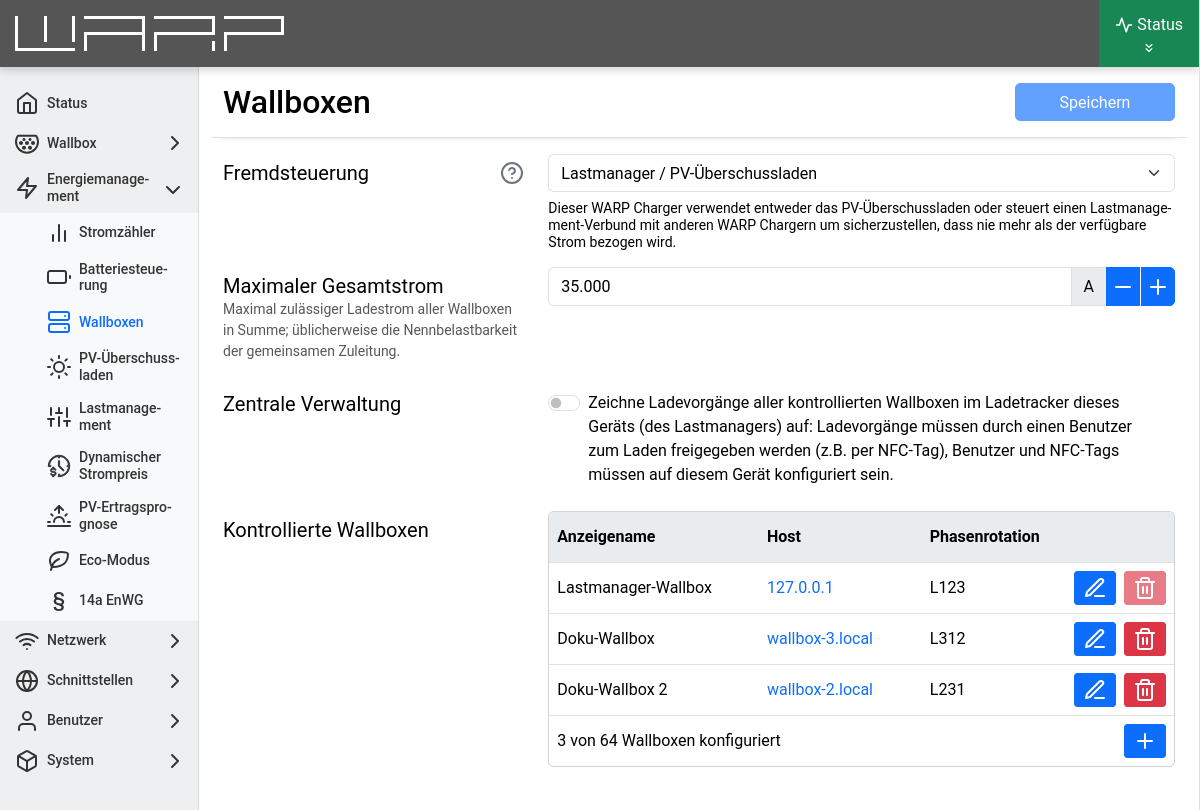
On this page, the controlled chargers are configured. The settings made here affect the charge management between the chargers.
Type 2 chargers communicate the maximum available charging current to the connected vehicles. The vehicle decides whether this charging current is fully utilized and whether a charging process is carried out single-phase, two-phase, or three-phase.
For a WARP Charger, the first setting to configure is how the charger is controlled (External Control):
- Disabled: No charge management takes place. The charger is completely independent.
- Externally Controlled: The charger is managed by another charge manager. No further settings need to be made.
- Charge Manager/PV Excess Charging: The charger operates as a charge manager. This is also the case when it should only perform the PV excess charging function independently. Further settings must be made.
Charge Manager Configuration
If a WARP Charger or WARP Energy Manager is configured as a charge manager, the following settings must be made:
Maximum Total Current
This is the maximum current of the supply line to the charge-managed chargers. The charge manager ensures that this current is not exceeded on any phase by never distributing more than this current to the chargers (static load management).
If all chargers have adequately dimensioned separate supply lines, this current can be set high enough that all chargers can safely receive their maximum current. All other components, such as the grid connection, must then be able to deliver the configured maximum total current. The individual maximum current of each charger remains unaffected.
This is static load management, which assumes that the set current is available on each phase at all times. Other consumers besides WARP Chargers that cannot be controlled by the charge manager are not taken into account!
Central Management
Additionally to the static and/or dynamic load mangement and PV excess charging, the central management can be enabled here.
When active, Charges are only started after a user authenticates themself (for example via NFC tag or the charge manager's status page). To configure Users and NFC tags, go to the charge manager's User management.
Additionally configured charger's charges are tracked in the charge manager's Charge Tracker. There, charge logs containing the collected charges of all chargers can be downloaded or sent periodically via mail.
The central management's release of charges has no relationship to a possibly configured (local) charge release of a configured charger's User management. It is possible to enable both the central management, as well as the (local) charge release. Users and NFC tags must then be configured on both the charge manager and the controlled charger. We recommend to use only one of the central management or the (local) charge release
Controlled Chargers
At the end of the page, the Controlled Chargers managed by the charge manager are configured and displayed. Additional chargers can be added by clicking +. For this, the display name and IP address or hostname of the charger must be entered and confirmed by clicking add. Automatically detected chargers that are not yet controlled by the charge manager are displayed as a list. For each charger, the phase rotation can additionally be set. This information is relevant for dynamic load management.
There is a dedicated tutorial for setting up charge management: Charge Management