Dynamic Tariff
If a dynamic electricity tariff (e.g. via Tibber or Awattar) is available, the dynamic tariffs can be used to improve the heating control (WARP Energy Manager) and the charging schedule of Eco Mode (WARP Charger).
Instead of implementing a different interface for each electricity provider, the system retrieves the general electricity exchange data (day-ahead prices) from the European Network of Transmission System Operators for Electricity (ENTSO-E). The respective dynamic tariff (from Tibber, Awattar, etc.) is composed of these electricity costs, as well as provider-specific additional costs (grid fees, taxes, price surcharges, VAT). By configuring these according to the respective provider, the dynamic tariff of the provider is calculated.
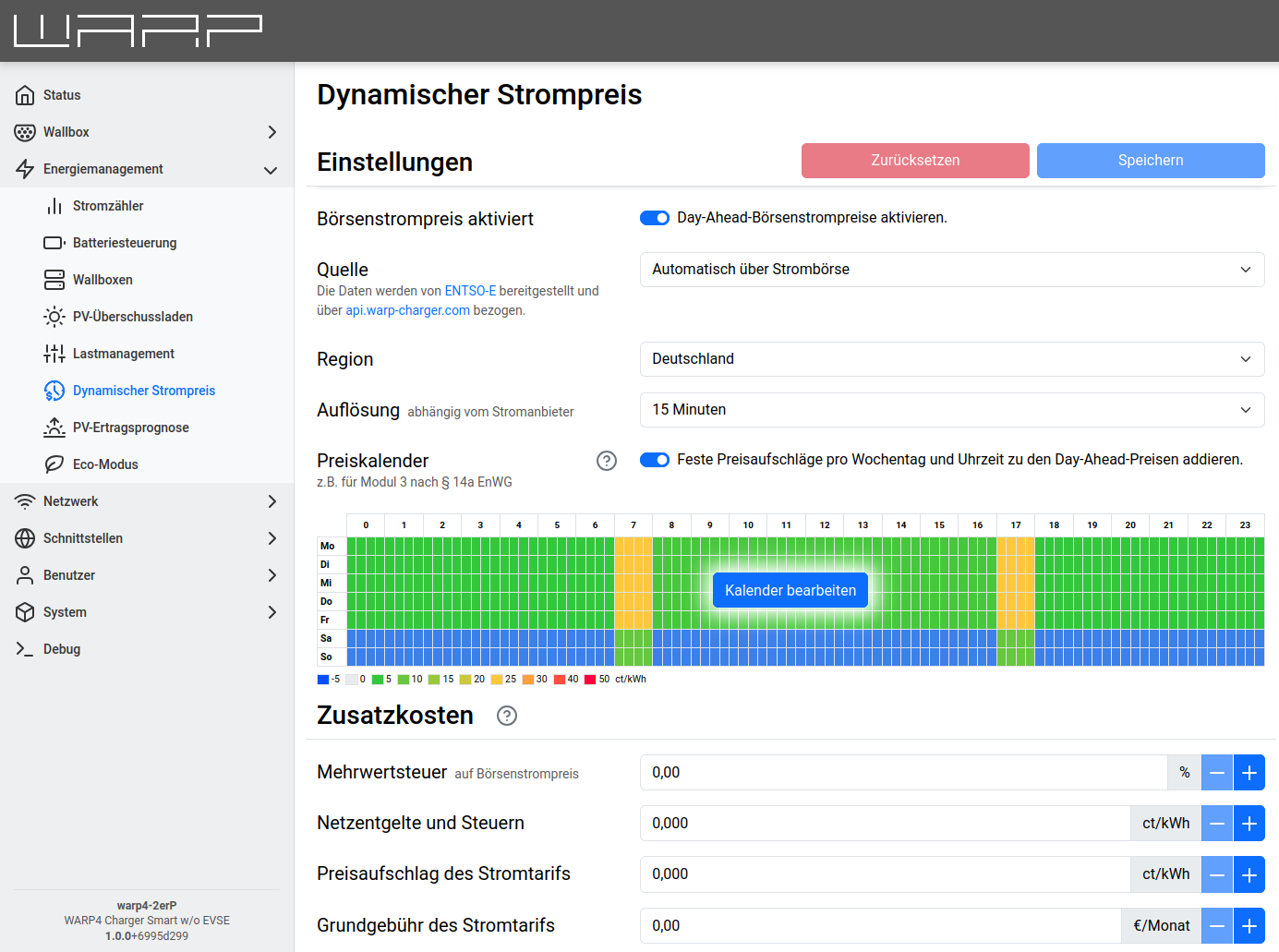
The source can be set to either Automatic via spot market or Push via API. With the automatic option, day-ahead prices are retrieved from ENTSO-E. In push mode, price data is provided via the API endpoint day_ahead_prices/prices_update.
When using the automatic source, the region and resolution must be configured.
Optionally, electricity provider-specific additional costs can be specified. The dynamic exchange electricity prices are only part of the electricity costs. Additional fixed taxes, grid fees, and surcharges apply.
The VAT refers to the VAT applied to the exchange electricity price (currently 19% in Germany). Additional costs can be found in the electricity provider's invoice.
There are three sensible options for the optional settings:
- Leave everything at 0: The net exchange price is displayed,
- Leave VAT at 0 and enter the net price in the fees: The net electricity price including fees is displayed.
- Enter VAT correctly and enter the gross price in the fees: The gross electricity price including fees is displayed.
For regulation, only the dynamic net exchange prices are always used, regardless of the additional costs.
Price Calendar
The price calendar allows defining fixed prices or price offsets per weekday and quarter-hour. This is particularly useful for implementing Module 3 according to § 14a EnWG (time-variable grid fees).
The price calendar can be used in two modes:
- In combination with the dynamic tariff: The calendar prices are added as offsets to the day-ahead spot market prices.
- Without the dynamic tariff (standalone): If the dynamic tariff is disabled, the calendar prices are used directly as electricity prices. This allows defining a fixed price schedule per weekday, e.g. for tariffs with fixed peak and off-peak rates.
Configuration
To enable the price calendar, activate the "Price calendar" switch. A calendar view will appear showing a weekly overview (Monday to Sunday) in quarter-hour resolution (96 time slots per day).
The Edit calendar button opens a dialog where prices can be entered:
- Select cells: One or more time slots can be selected by clicking and dragging.
- Enter price: Enter the desired price in ct/kWh in the input field.
- Apply: Click "Apply" to apply the entered price to all selected cells.
- Save: Click "Save" to save the calendar.
The cells are color-coded to visualize the prices.
Example: Module 3 according to § 14a EnWG
Module 3 provides for time-variable grid fees. In practice, this means that reduced grid fees apply during off-peak hours (e.g. at night) and increased grid fees during peak hours (e.g. in the evening).
To represent this, the grid fee differences are entered in the calendar. For example, if the grid fee is 3 ct/kWh lower during off-peak hours and 2 ct/kWh higher during peak hours compared to the standard rate, -3 and +2 are entered in the corresponding time slots. These offsets are then automatically added to the day-ahead prices.
Status
After the dynamic tariffs have been configured and activated, there is an overview of the electricity prices further down on the page.
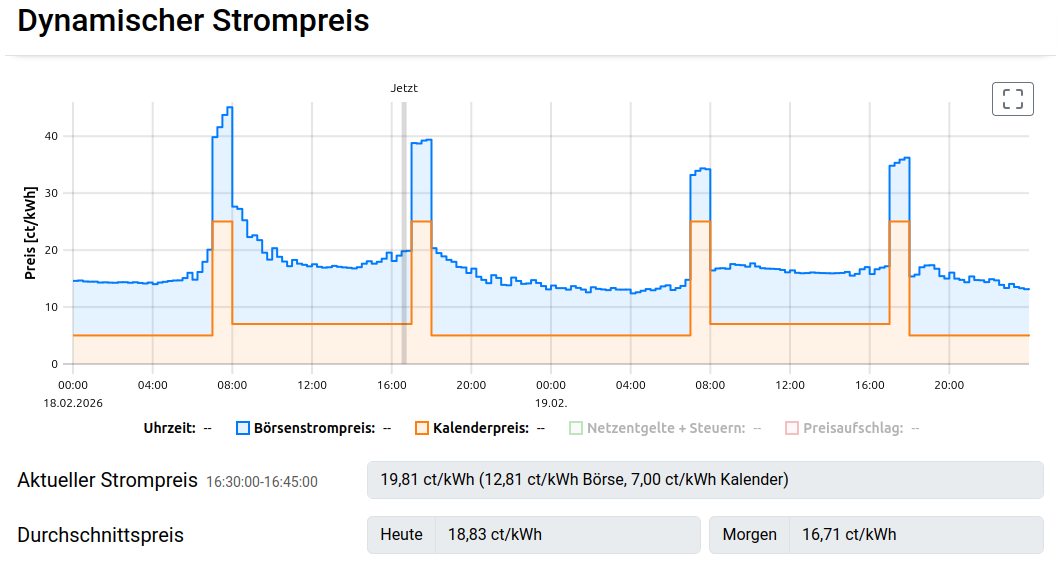
The price chart shows the electricity price trend for today and tomorrow. If both the spot market price and the price calendar are enabled, the two components (spot market price and calendar price) are displayed separately and stacked in the chart.