§14a EnWG
The following video explains §14a EnWG and shows the setup on the WARP Charger and the WARP Energy Manager.
The video is only available in German (with German subtitles). §14a EnWG is a German regulation, and the video uses the German terms as they appear in the documents of the German grid operators.
§14a of the German Energy Industry Act (Energiewirtschaftsgesetz, EnWG) allows grid operators to temporarily reduce the power consumption of controllable consumer devices (chargers, heat pumps, battery storage, air conditioning) to prevent local grid overload. The devices are never fully shut off. A minimum of 4200 W always remains available.
This page configures the central §14a EnWG control. Depending on the selected signal source, when a control signal is received the calculated power limit is automatically applied to the configured consumers (chargers and/or heating).
The §14a EnWG control is available on the WARP Charger and the WARP Energy Manager. Depending on the device, different signal sources and target devices are available.
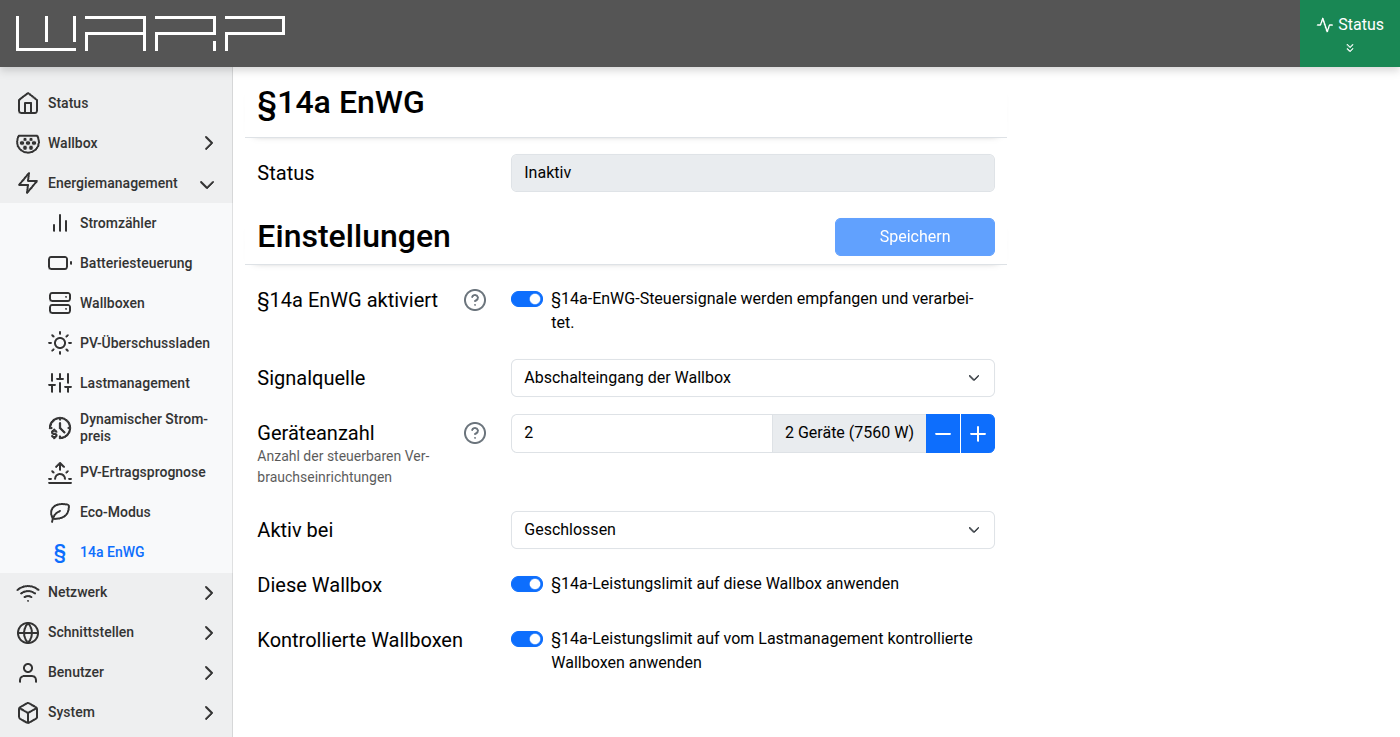
Configuration
§14a EnWG enabled
Enables or disables the §14a EnWG control. When disabled, no power limits are applied.
Signal source
The signal source determines where the grid operator's control signal is received from. The following options are available:
- Charger shutdown input (WARP Charger only): The signal is received via the potential-free shutdown input inside the charger. A ripple control receiver or control box from the grid operator is connected directly to the shutdown input.
- WARP Energy Manager input (Energy Manager only): The signal is received via one of the inputs of the WARP Energy Manager (WARP Energy Manager 2.0: four inputs, WARP Energy Manager: two inputs). The ripple control receiver or control box is connected to an input of the Energy Manager. The chargers are then controlled via the network.
- EEBUS: The control signal is received via the EEBUS interface. EEBUS is the designated interface for grid operator control of consumer devices. EEBUS must also be enabled under
Interfaces->EEBUS. - API: The control signal is received via the HTTP/MQTT API. Details can be found in the API documentation under
p14a_enwg/control_update. The power limit is passed along with the signal. A state set via the API is reset to inactive on reboot.
The following settings Input, Device count and Active on are only shown if an input (charger shutdown input or WARP Energy Manager input) is selected as the signal source.
Input (Energy Manager only)
Selects the input of the WARP Energy Manager to which the ripple control receiver or control box is connected.
Device count
Number of controllable consumer devices managed by the energy management system. The minimum power for a single device is 4200 W. For multiple devices, the minimum power is calculated using simultaneity factors:
4200 W + (number of devices − 1) × simultaneity factor × 4200 W
| Device count | Simultaneity factor | Calculated limit |
|---|---|---|
| 1 | — | 4200 W |
| 2 | 0.80 | 7560 W |
| 3 | 0.75 | 10500 W |
| 4 | 0.70 | 13020 W |
| 5 | 0.65 | 15120 W |
| 6 | 0.60 | 16800 W |
| 7 | 0.55 | 18060 W |
| 8 | 0.50 | 18900 W |
| 9 | 0.45 | 19320 W |
| 10+ | 0.45 | 4200 W + (n − 1) × 0.45 × 4200 W |
Active on
Determines at which input state the power limit becomes active:
- Closed: The limit is applied when the input is closed (default configuration).
- Open: The limit is applied when the input is open.
Target devices
This section configures which consumers the power limit should be applied to:
- This charger (WARP Charger only): Applies the power limit to the local charger.
- Managed chargers: Applies the power limit to all chargers controlled by the charge manager. This device must be the charge manager of these chargers.
- Heating (WARP Energy Manager 2.0 only): Applies the power limit to the connected heating system (heat pump via SG-Ready).
Heating max. power (WARP Energy Manager 2.0 only)
Specifies the maximum power draw of the heating system in watts. The setting is intended for a later integration of the heating into the charge management and is currently not evaluated yet.
Status
When the §14a EnWG control is enabled, the current status is displayed at the top of the configuration page:
- Status: Shows whether the power limit is currently active or inactive.
- Current limit: Shows the currently applied power limit in watts (only visible when active).
Additionally, the status indicator of the web interface (top right, in the app on the status page) shows the entry "14a EnWG" with its state, e.g. "Active (4200 W)".
To test the configuration, Active on can temporarily be set to Open and saved. As long as the control box does not send a signal, the input is open and the limit becomes active immediately. Afterwards set the option back to Closed and save.
Differences between WARP Charger and Energy Manager
| WARP Charger | Energy Manager | |
|---|---|---|
| Signal source "Input" | Charger shutdown input | WARP Energy Manager input |
| Input selection | Not available (single input only) | Input 1–4 (WARP Energy Manager: 1–2) |
| This charger | Available | Not available |
| Heating | Not available | Available (WARP Energy Manager 2.0) |
| Heating max. power | Not available | Available (WARP Energy Manager 2.0) |
Further information
- Controllable Consumption Device According to §14a EnWG (Tutorial) — Overview of the various implementation options
- Heating — SG-Ready control configuration
- EEBUS interface — Details on the EEBUS connection